Journey from browser tabs to Pune RTO
The phrase “driving licence renewal” usually evokes the same sense of joy as your dentist doing a root canal; painful but needs to be done. Driving with an expired or invalid licence is a punishable offence, and in case of a mishap while you’re driving, insurance won’t be of any use.
In India, you can get a permanent driving licence once you’re 18. with a validity of 20 years. The next renewal is due 12 years later or when you turn 50, whichever is earlier. After that, licence validity drops to 10 years, and post the age of 60, renewal is due every 5 years. There are usually no changes to the renewal process except in case of any health issues, which may impact the ability to ride a 2-wheeler or drive a 4-wheeler.
You can apply for renewal of driving licence within 30 days of the expiry date, and I decided to get this done myself. No agent, tout, and no friendly gentleman outside the RTO who somehow knows your entire application history despite never having met you.
Just me, the internet, my documents, and a solid level of optimism, because over the years, there have been several improvements. This is largely because you can complete a significant part of the process online via the the Ministry of Road Transport & Highways Sarathi portal.
Using the Sarathi portal
From the home page, selecting “Maharashtra” as the State brings up a pop-up for “Contactless Licence Services”. This means using Aadhaar authentication and works if your name and date of birth in Aadhaar exactly match those on your driving licence. I didn’t use this, so skipped it.
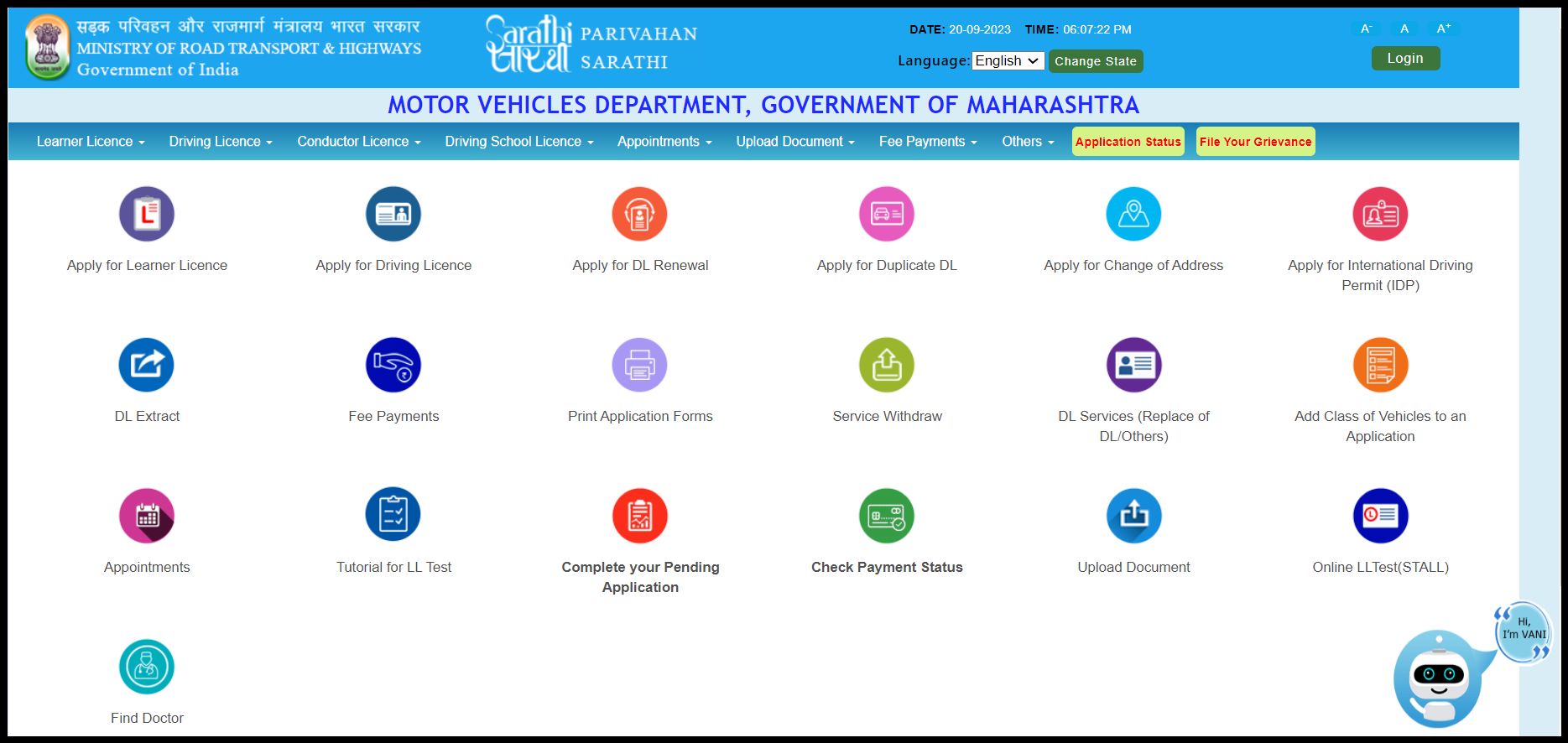
From the next screen, after selecting the option to “Apply for DL Renewal”, it shows the process and details of required documents. Next, provide your driving licence number, date of birth, the ever-present CAPTCHA (on all Govt websites), and proceed to fetch your licence details.
In my case, I was astonished to see the gender mentioned as “Female”. Whoever did the data entry several years ago during the move from paper licence to smart cards made an error. I applied for editing the information and submitted that application in person at the “C” Block, RTO Office near Sangam Bridge.
The official there was quite casual, and said I took unnecessary trouble as gender was anyway not printed on the licence. I told him it could (and would) create problems later on during renewal, and he grudgingly agreed. The change was updated online in 2-3 days.
Form 1 and Form 1-A
Form 1 contains a self-declaration about one’s own fitness, followed by Form 1-A (Medical Certificate), signed by a registered medical practitioner.
Here, I made a mistake.
Assuming I had to upload a scanned copy, I downloaded and printed a blank Form 1-A, filled it, the doctor signed it. However, after starting the process, I saw the pre-filled form 1-A with the application number and barcode. I had to print *that* pre-filled form, which the doctor completed and signed again.
Form-2 is the main application form for renewal of driving licence. It’s a five page document with personal information, address, existing licence details, and sure enough, had “gender”. Good that I got it corrected earlier or I would’ve been stuck here.
Charges
Once done, the next step was payment. This was Rs. 474 in total:
| DL Renewal Fee: | Rs. 200 |
| Form 7 Fee (Smart Card): | Rs. 112.99 |
| Service/User Charge: | Rs. 103.01 |
| Postal Charges: | Rs. 58 |
Final step: select a time slot for RTO visit, print the application and reference slip, and submit all the papers in person at the RTO (since I had not opted for Aadhaar based contactless services).
The RTO Premises
This is one of those places where modern and traditional versions of India coexist. The atmosphere has its own rhythm: queues, counters, forms, questions, people asking where to go next. However, I’d gone there a bit early, so it wasn’t very crowded. There was some confusion about which counter to submit the documents (different ones for offline vs online applications).
How to check application status
You can check the application status of your driving licence renewal from the same portal. It shows the timeline of various flows in the process completed by applicant and the RTO, along with date. These are:
| Completed by Applicant | Flow at RTO |
| Services on DL | Scrutiny |
| Upload Documents | Approval of endorsement on DL |
| Fee Payment | Printing of DL in Form 7 |
| DL dispatch by post |
The Agent-Free Experience
The most satisfying part of this entire exercise was doing it without an agent, and without paying any unnecessary + exorbitant charges.
Personally, I prefer this.
Not just for driving licence but even other services related to passport, banks, insurance companies, mutual funds etc, because you have complete control over the application process and the accuracy of information. With an agent or sales executive etc who ask you to “just sign here and here”, there is ALWAYS the risk of some goof up, and then you end up chasing customer support for correction.
No doubt there is some inconvenience in having to do everything yourself, whether filling forms online or visits and submission of docs offline, waiting in queues etc, but those are minor issues.
The other important aspect here is: when you do this yourself, it’s much more educative. You learn how the system works. You notice things more and become familiar with the process, instead of just paying an agent to do everything without being aware of what goes on.
Time taken for online driving licence renewal
They took 18 days for the scrutiny and approval, and 8 days for printing and dispatch by post. I received it 3-4 days after dispatch, so ~30 days in total.
Not bad at all.
* I liked the colour scheme and layout of the previous smart card (red + white). This new smart card has different shades of blue, so the text is not as clear as before. The chip has been replaced with a QR code on the reverse side.